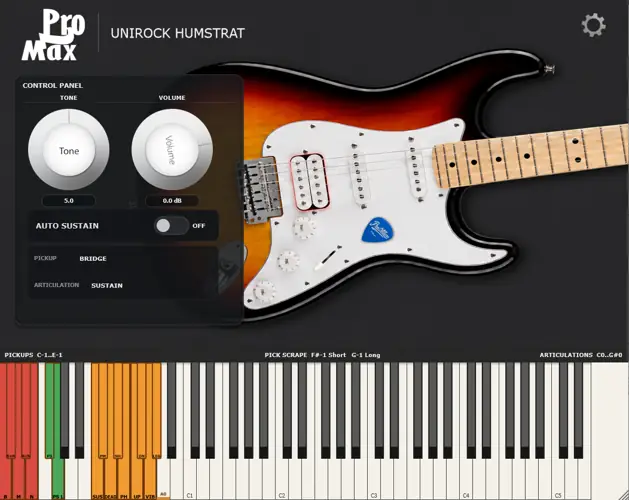
Unirock HumStrat (Electric Guitar)
1.6 GB
Pro2Max Unirock HumStrat is a physically modelled HSS electric guitar instrument for Windows. It ships as a VST3 plugin and as a standalone application.
HumStrat is designed to provide a complete playable electric guitar rather than a cut-down free edition. Its 1.7 GB sample library includes every fret, five pickup positions and multiple articulations for realistic guitar programming.
Features include:
5 pickup positions: bridge humbucker, bridge + middle, middle, middle + neck, and neck.
Every fret sampled.
Round-robin variation.
Multiple velocity layers.
Sustain.
Palm mute.
Dead notes.
Natural harmonics.
Pinch harmonics.
Slide up.
Slide down.
Vibrato.
Legato slide.
Pick scrapes.
Keyswitch control for articulations and pickup selection.
Volume and tone controls.
Auto Sustain option.
VST3 plug-in and standalone versions.
Approximately 1.7 GB installed size.
HumStrat outputs an electric-guitar signal intended to be used with your preferred amp simulator, cabinet simulator and effects, just like a recorded DI guitar.
There are no paid upgrades, feature restrictions or reduced editions. The complete instrument is available for free.
What’s Included
VST3 instrument plugin for 64-bit Windows hosts.
Standalone Windows application.
A 1.70 GB sample library used for the main sustain sound and performance effects.
Five pickup positions, guitar articulations, pitch bend, auto sustain, and PickScrape keyswitches.
Installation
Installer
Run Pro2Max_Unirock_HumStrat_1.0.0_Setup.exe.
The installer places the VST3 plugin in the common 64-bit VST3 folder and installs the standalone application. During installation you can choose where the sample library goes. This can be on another drive, for example D:\Pro2Max\Unirock HumStrat\Samples, if your system drive is low on free space.
The installer writes the selected sample library path to:
C:\ProgramData\Pro2Max\Unirock HumStrat\SampleLibraryPath.txt
Do not move or rename the sample library folder after installation unless you update that path file or reinstall.
Portable ZIP
Extract the portable archive to any drive with at least 2 GB free.
Keep this layout:
Your Folder/
Pro2Max Unirock HumStrat.vst3/
SampleLibrary/
README.md
LICENSE
Recommended: add Your Folder to your DAW’s VST3 scan paths.
If you copy Pro2Max Unirock HumStrat.vst3 into another VST3 folder manually, copy SampleLibrary to the same parent folder too. The plugin finds the library automatically only while the VST3 bundle and SampleLibrary remain side by side.
Controls
Pickup Keyswitches
Pickup switching is done only by keyswitch. Clicking the guitar image does not change the pickup.
Key MIDI note Pickup
C-1 12 Bridge
C#-1 13 Bridge + Middle
D-1 14 Middle
D#-1 15 Middle + Neck
E-1 16 Neck
Pickup keys are red on the on-screen keyboard.
PickScrape Keyswitches
Key MIDI note Effect
F#-1 18 Short PickScrape
G-1 19 Long PickScrape
PickScrape keys are green on the on-screen keyboard. The scrape stops when you release the key.
Articulation Keyswitches
Key MIDI note Articulation
C0 24 Sustain
C#0 25 Palm Mute
D0 26 Dead Note
D#0 27 Natural Harmonics
E0 28 Pinch Harmonics
F0 29 Slide Up
F#0 30 Slide Down
G0 31 Vibrato
G#0 32 Legato Slide
Articulation keys are orange on the on-screen keyboard.
Slide Down is a momentary performance command: while a note is ringing, press F#0 to slide it down. It does not become the next latched articulation.
Legato Slide is overlap-driven: select G#0, play a note, then start the next note before releasing the first one.
Playable Range
The playable guitar range starts at A0 / MIDI 33. Notes below the real low E are modelled as a loosened/retuned sixth string.
Tone, Volume, Auto Sustain
Tone: passive-style brightness control. 10 is fully open.
Volume: master output level.
Auto Sustain: when enabled, released notes continue to decay naturally instead of being hand-damped immediately.
Pitch Bend
Pitch bend is enabled by default. Open the settings panel with the gear icon to enable/disable pitch bend and set the bend range from 1 to 12 semitones. The default range is 2 semitones.
Troubleshooting
The plugin says samples are missing
Use one of these fixes:
If you used the installer, reinstall and choose the correct sample library folder.
If you moved the library manually, edit C:\ProgramData\Pro2Max\Unirock HumStrat\SampleLibraryPath.txt so it points to the folder containing the WAV files.
If you use the portable ZIP, keep SampleLibrary beside Pro2Max Unirock HumStrat.vst3.
The plugin does not appear in the DAW
Rescan plugins in your DAW. For portable use, add the folder containing Pro2Max Unirock HumStrat.vst3 to your VST3 scan paths.
Windows SmartScreen warning
Unsigned freeware installers can trigger SmartScreen on some systems. Verify the SHA-256 hash published with the download before running the installer.


Unirock.HumStrat.1.0.0.part1 ( 850 MB )
Unirock.HumStrat.1.0.0.part2 ( 804 MB )