RVRSE
10 MB
Instant reverse reverb risers from any sample. Load a one-shot, play a MIDI note, get a tempo-synced rise and hit.
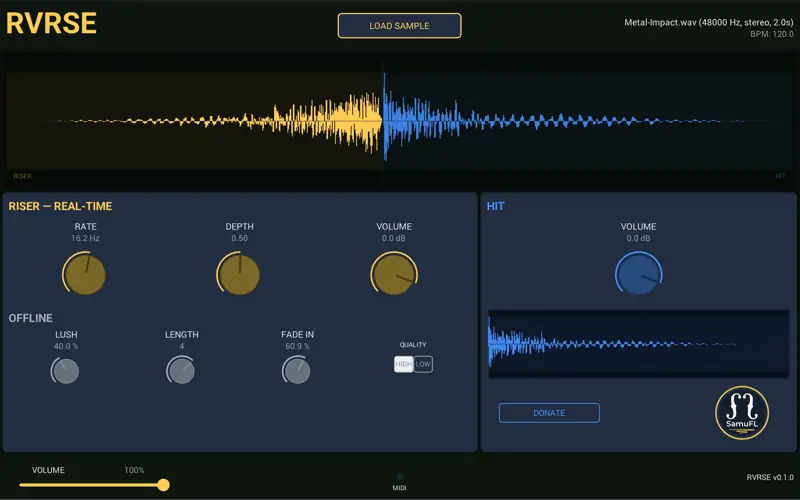
RVRSE generates a reverse-reverb riser automatically from any loaded hit sample, then fires the original hit at a tempo-synced beat boundary. One sample in → complete transition out. No external audio editing or extra samples needed.
How It Works
Load a one-shot hit sample (uncompressed WAV or AIFF) via the LOAD SAMPLE button, or drag the file onto the header, footer, or either waveform.
Trim the source on the lower hit waveform by dragging the front/back handles. The dimmed outer regions are excluded non-destructively. Release a handle to rebuild; double-click either handle to reset that edge.
Preview the sound either by clicking the waveform-panel Play button (centered below the waveform) or by playing a MIDI note.
Export the current normal riser+hit result from the header Export button to a 24-bit WAV file in one step.
Shape the transition with Riser Release. It lets the riser decay beneath the hit after the Beat Anchor; it does not fade or crossfade the dry hit.
The riser is your hit sample processed through reverb → reversed → time-stretched to match the configured riser length (default: 4 beats at host BPM), then released beneath the hit for the requested post-beat duration (default: 50 ms).
Because the riser IS the hit reversed and reverbed, the timbral build-up always matches the impact perfectly.
I. Load a one-shot
Drop any sample — a pad, a vocal, a synth stab, a bass note — onto the plugin.
II. Play a MIDI note
RVRSE generates a tempo-synced reverse reverb riser, automatically pitched to your note.
III. Get a rise and hit
The riser tail meets the original hit on the downbeat. Ready for your drop, transition, or tension build.
Creative controls, not clutter
What’s Inside
RVRSE focuses on the small set of controls that actually matter when you want to turn any sample into a polished, tempo-synced reverse riser.
Shape the tail
Dial in the size and character of the reverb tail, then stretch it from a quarter beat to sixteen bars while staying locked to project tempo.
Add movement and impact
Use the built-in stutter effect for rhythmic motion and rely on HQ time-stretching to keep your source sounding musical at any rise length.
Automate everything
Every parameter is ready for automation, so you can draw transitions, map macros, and shape builds directly inside your DAW.
Built in the Open
RVRSE is MIT licensed and fully open source. The source code, build scripts, and documentation are on GitHub — fork it, audit it, contribute.
RVRSE is also the proof-of-concept for the Open Sampler project — a long-term effort to build a modern, open-source sampling engine. If you’re a developer, composer, or just curious, follow along.
System Requirements
Formats & Platforms
Formats: VST3, AU, Standalone
Architectures: macOS (Apple Silicon), Windows x64
macOS: 11 Big Sur or later
Windows: Windows 10 or later
DAW & Installer
DAW: Any VST3 or AU compatible DAW
Tested in: Cubase, Studio One, Reaper, and more
Installer: Approximately 25 MB


RVRSE.1.1.0 ( 10 MB )