Pathfinder
36 MB
Turn any folder of samples into a playable instrument.
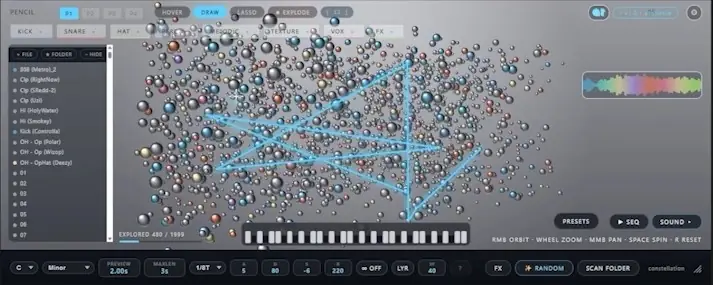
Drop a folder of samples and Pathfinder scatters them into a living field of light. Draw a path to play it, pull a sphere apart into tempo-synced grains, and shape the whole thing with effects.
Four moves. That’s the whole instrument.
No menus to learn. You drop, draw, explode, and shape — and the field responds in real time.
Drop in a folder
Drag any folder of samples straight onto the plugin — it analyzes each one and scatters them into a 3D field. Brighter, closer spheres are the sounds it likes best for playing.
Draw a path to play
Trace a line through the field and Pathfinder plays every sphere it crosses, in order. The shape of your line becomes the rhythm and melody of the phrase.
Explode a sphere
Grab a single sound and blow it apart into tempo-synced grains. One sample becomes a swarm you can re-scatter, re-pitch, and play back as a texture.
Shape it with FX
Drag effects into any order — reverb, degrade, flair, delay and a granular engine — and reorder the chain live to sculpt the field into a finished sound.
A granular sampler that feels like an instrument.
Your samples, mapped
Nothing is baked in. Feed it your own drum kits, field recordings, or one-shots and it builds a fresh field from whatever you give it.
Drawn, not programmed
Paths are performances. Draw fast or slow, jagged or smooth — the gesture is the sequence, so no two takes are the same.
Tempo-synced grains
The granular engine locks to your DAW. Explode a sound and every grain lands on the grid, from tight stutters to slow, drifting clouds.
// the toolkit
Everything inside.
A whole sampler lives under the map — scan, draw, sequence, edit and process, all in one instrument.
Particle map
Every sample becomes a sphere, auto-sorted into kick, snare, hat, perc, melodic, texture, vox and FX.
Category detection means you find the right sound by where it sits — not by scrubbing filenames.
Draw the path
Play any route from MIDI, tempo-locked and pitch-corrected to your project key and scale.
Key detection lets samples from totally different sources play in tune together — no manual retuning.
Layer mode
One key fires your whole captured group as an instant stack.
Explode
Select a sample and slice it into tempo-synced chunks scattered back onto the map.
A fast way to turn one hit into a whole palette of rhythmic fragments.
Step sequencer
Per-lane sounds, with swing and nudge.
Deep sound editor
Trim, envelope, pitch and volume per sound, plus a chromatic pitch-tracked keyboard for any sphere.
Five-effect chain
Reverb, Degrade, Flair, Delay and a tempo-synced Granular engine — drag to reorder, with full parameter pages.
Presets that remember everything
Paths, sequencer, effects, categories and settings, all saved together.
MIDI CC learn · scalable interface · built-in walkthrough
// techniques
Things to try.
No two folders make the same map. No two paths make the same instrument. A few places to start:
In-key arps
Draw a path across only your melodic spheres for evolving arpeggios that stay in your song’s scale.
Granular textures
Explode a vocal or pad, then draw a new path through the fragments for moving, atmospheric fills.
Kits from chaos
Lasso your kick, snare and hat spheres and build a drum pattern in the step sequencer from found sounds.
Instant chords
Capture a melodic group in Layer mode to turn any folder into a one-key chord instrument.


Pathfinder.1.0.4.WIN ( 8 MB )
Pathfinder.1.0.4.MAC ( 2 MB )