Noise Canvas
149 / 589 / 312 MB
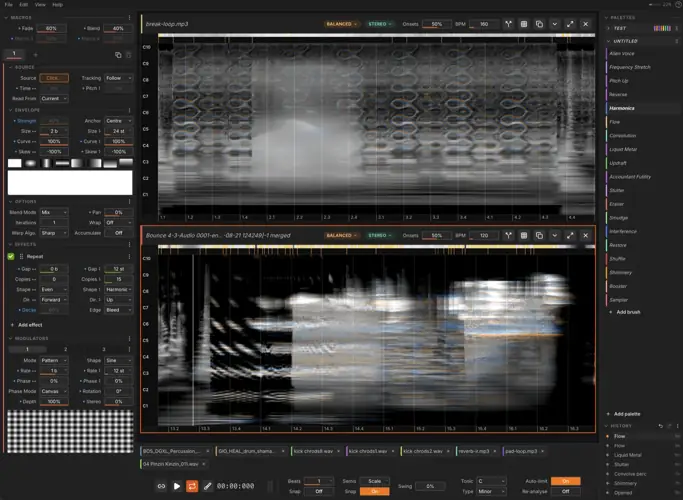
Noise Canvas is a tool for doing spectral sound design. It loads audio files, shows them as spectrograms, and lets you paint transformations and effects directly onto the sound in beats and semitones. It’s building upon the shoulders of projects like Metasynth, but with proper phase handling, more modern UI, better DAW integration etc. The whole thing is painting-coded: you have brushes, palettes, strokes etc. I designed it to feel like a canvas into which you’re dabbing splotches of colour. And it has pen tablet support so you can sketch with a stylus. You can get pretty interesting sounds with it.
What it does
– Paint on spectrograms. Brushes paint effects across time and pitch, snapped to a musical grid and scale.
– 11 spectral effects — dynamics, transform, blur, repeat, synthesise, evolve, binaural, sort, transmute, convolve, attract — stackable and reorderable, several instances at a time.
– Multi-step brushes with four macros, a preset library, and hotkeys.
– Deep modulation — three per-pixel 2D modulators (patterns, procedural textures, your own images, envelope follower, sequencer), plus macros, pen pressure/tilt, and contextual sources.
– Branching history that survives restarts, with favourites and per-branch audio export.
– Stem splitting — harmonic/percussive, NMF, or AI separation — with lossless merge back.
– Slots into any DAW as its external sample editor. Ableton Live goes further: a Live 12 extension embeds the whole editor, and Ableton Link keeps tempo in sync.
Everything runs on the GPU and resynthesises after every stroke, so you hear the real audio immediately.


WIN ( 113 MB )
Mac Intel ( 143 MB )
Mac, Apple Silicon ( 138 MB )
Linux ( 155 MB )