 by
by Osoumen C700
9.4 MB
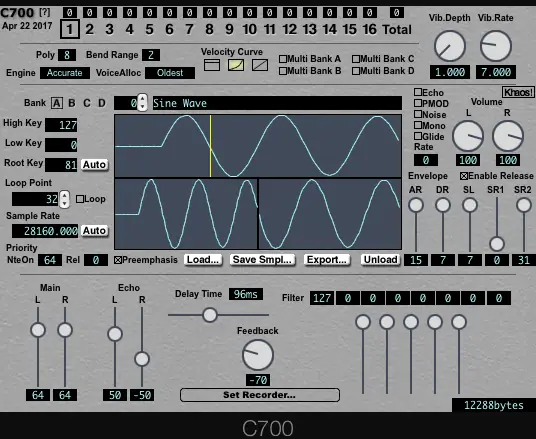
Software Sampler plugin for AU/VST and MacOSX/Windows
This is a software sampler that emulates the Super Nintendo’s built-in sound source.
It supports importing AIFF (Mac only) and WAV files with loop points set.
It supports reading and writing raw BRR in AddmusicM format.
It is possible to play the actual chip in sync with the GIMIC equipped with an SPC module .
When USB hardware is recognized, an icon will appear in the bottom right corner of the UI.
Operating environment
macOS version
Mac (Intel, Apple Silicon) running macOS 10.11 or later
Audio Units or VST2.4 compatible host application
Windows version
A host application compatible with VST2.4 on Windows Vista or later (32/64bit)
Operation confirmed host
macOS
Logic Pro 10.7 (Intel,Apple Silicon) (macOS Big Sur 11.6.1)
Digital Performer 8 (32/64bit) (10.8.5)
Digital Performer 9.12 (32/64bit) (10.10.5)
Windows
Cubase 10 (32/64bit) (Windows 10)
Differences between the Mac and Windows versions
The Mac version can load AIFF, WAV, and SD2 waveform data, but the Windows version can only load WAV (there is a bug).
The Mac version will detect when the USB hardware is plugged in or unplugged during operation, but the Windows version only checks when the plugin is launched.
The Mac version is probably more stable.
Functional Description
Various waveform data can be directly read.
Supports AIFF (Mac only), WAV, SPC and AddmusicM format brr files.
Up to 128 waveforms can be registered.
Supports program change, pitch bend, and modulation wheels.
This is set for each MIDI channel.
The maximum sampling rate of the playback waveform is 120kHz.
Normally, the waveform number corresponds to the program change.
Alternatively, multiple waveforms can be treated as one bank.
Up to four banks can be used in total, and each bank can be set to multi-sample mode.
When a bank is set to multi-sample mode, if you select one of the waveform numbers in the bank with a program change, the corresponding bank will be selected.
The waveform HighKey and LowKey settings are only effective in multi-sample mode.
Tips for making it sound good
The total of all parts must not exceed 8 notes.
The total waveform + echo memory is kept to about 40kB.
It is better to truncate the waveform than to reduce the sampling rate.
Use key splits for a wide range of tones.
Set up your echo carefully.
The sampling rate of the waveform can be low except for the highest note or two.
If you record the note A, the pitch will be a multiple of 440Hz, so one cycle will be an integer number of samples.
To make a nice loop, use a tuner or something similar to adjust the pitch as accurately as possible.
https://github.com/osoumen/C700


Download ( MB )