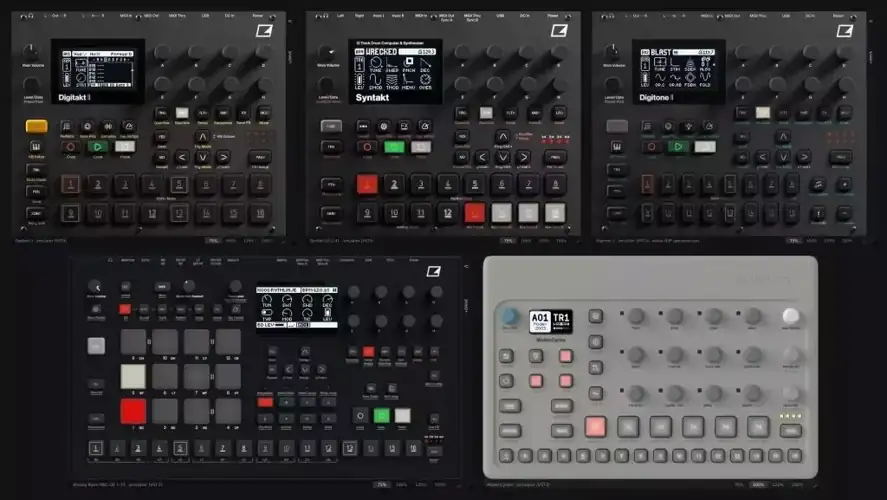
Elektron Emu
55.82 MB
VST3 plug-ins that emulate five Elektron machines: Digitakt II, Syntakt, Analog Rytm MKII, Digitone II and Model:Cycles. They don’t imitate the sound. They run the real operating system of the machine inside an emulated CPU, so the menus, the sequencer and the sounds are the ones you get on the hardware.
The +Drive is emulated too: it’s the real storage the OS formats and uses, so projects, sounds and samples live there like on the hardware. On the Digitakt II, Rytm and Digitone II a +DRIVE tab on the side of the plug-in lets you load your own WAV files into it.
Each folder has the plug-in for Mac and Windows, the source code and a README.
The firmware is not included
You have to download the OS yourself from the Elektron website (Support → Downloads) and put the .syx file here:
Mac: ~/Library/Application Support/Elektron Emu//Firmware/
Windows: %APPDATA%\Elektron Emu\\Firmware\
The plug-in creates the folder and tells you what to do if the file is missing. Only one OS version works for each machine; the README of each plug-in says which one. The first start takes a while (up to two minutes on the Rytm). After that your projects, sounds and samples stay saved, even if you close the DAW without saving.
Installing
Copy the .vst3 to ~/Library/Audio/Plug-Ins/VST3 on Mac, or to C:\Program Files\Common Files\VST3 on Windows, then rescan the plug-ins in your DAW.
The Mac plug-ins aren’t signed by Apple, so macOS blocks them after you download them. Unblock them once with:
xattr -dr com.apple.quarantine ~/Library/Audio/Plug-Ins/VST3/*.vst3
What isn’t real
The Rytm’s analog voices and effects, and the Syntakt’s analog tracks 9–12, are analog circuits, not code. There’s nothing in the firmware to run for them. On the Rytm I wrote my own model, so it plays, but it doesn’t sound like the real machine. On the Syntakt those four tracks are simply missing. The only way to get them right would be to measure the real hardware.
The Digitone II’s DSP is compiled on your own computer the first time you open the plug-in (a few minutes, it needs a C compiler), then it plays in real time. Without a compiler it falls back to a slow interpreter that only renders offline.
Note
This is a personal project, not affiliated with Elektron. Elektron and the machine names are their trademarks. The panel photos are Elektron’s.


Elektron.Emu ( 56 MB )