Orbinator
14 MB
Orbinator is a wavetable synth where the wavetables are not fixed — they evolve.
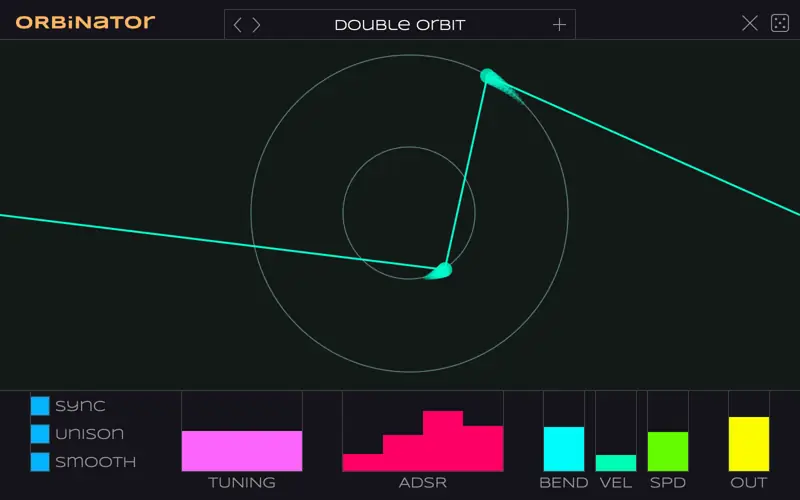
Place one or more orbs and give them a speed, direction and rotation radius. The line that connects the orbs describes a single cycle of the waveform that gets played. Because the orbs move, the wave is always changing shape.
This plug-in was inspired by an obscure method known as scanned synthesis where the wavetable is dynamically generated from a physical model of masses and springs. In Orbinator, the “physical model” consists of dots spinning around circles with an imaginary string between them.
How to use
Double-click anywhere in the window to add a new orb. You can add up to 8 orbs.
Hover near the center of a circle to reveal additional controls that do the following:
SPEED Click on the icon and drag up or down to change the rotation speed and direction. Double-click to stop the orb from moving.
MOVE Drag to reposition the circle. Double-click to delete this orb.
SIZE Drag up or down to change the circle radius. Double-click to restore default size.
Main controls:
SYNC If enabled, the rotation speed of the orbs is relative to the BPM. Speeds range from one 1/16th note per revolution (fast!) to 16 bars (slow).
UNISON Adds extra detuned voices.
SMOOTH If enabled, uses smooth interpolation between the orb positions, otherwise uses linear interpolation. (The UI always shows straight lines even if smooth is enabled.).
TUNING Pitch adjustment in octaves, semitones, and cents.
ADSR Your typical envelope controls.
BEND Amount of pitch bend in semitones, for the pitch wheel.
VEL Velocity sensitivity. If off, velocity is ignored.
SPD Sets the simulation speed, from 0.1 – 10×. This affects the speed of the orbs. You can also use the mod wheel for this. (Note: The animation speed in the UI doesn’t change.).
OUT Output level in dB.
Supported platforms
Free download for Mac (AU, VST3), Windows (VST3), and Linux (VST3, LV2).
Made by a human for the KVR Developer Challenge 2026.


Orbinator.1.0.0 ( 14 MB )