Semedo Notes
14.7 MB
Audio-to-MIDI Transcription Plugin. You play or sing something — it listens, analyses the audio, and converts it into clean MIDI notes that you can use in your DAW.
Drop in a guitar recording, a piano melody, a vocal line, a bass riff, or even a full instrument — Semedo Notes figures out which notes were played, when they started, how long they lasted, and how loud they were. It turns all of that into a MIDI file you can drag straight into your project.
No keyboard skills needed. No MIDI controller needed. Just play or sing.
AUDIO TO MIDI — THE CORE
Drop any audio file onto the plugin — WAV, AIFF, FLAC, MP3 or OGG — and Semedo Notes analyses it and produces a full MIDI transcription in seconds. It works on single instruments: guitar, piano, bass, voice, strings, flute, synth lead — any source where individual notes can be identified.
LIVE RECORDING
Hit the REC button while your DAW is running. Semedo Notes captures your live input — microphone or instrument — for up to 2 minutes and transcribes it the moment you stop. No need to bounce to a file first.
GHOST NOTE FILTER (unique to Semedo Notes)
This is what sets Semedo Notes apart from similar tools. Every AI pitch detector generates false notes — overtones, room noise, bleed, and artefacts that appear in the MIDI as notes that were never actually played.
The Ghost Filter automatically removes these:
– It detects and removes octave overtones (harmonics that sound above the real note but were not played independently).
– It removes low-confidence notes that are too quiet relative to the real notes in the same moment.
– It enforces a polyphony limit so chords stay clean instead of turning into a wall of unwanted extra voices.
The result is MIDI you can actually use without spending an hour deleting wrong notes by hand.
PURITY CONTROL
A single knob controls how aggressively the plugin cleans up the result. Turn it down to keep everything the model detected. Turn it up to keep only the notes the plugin is most confident about. You stay in control of the balance between completeness and cleanliness.
PITCH BEND / EXPRESSION EXPORT
Semedo Notes detects the micro-pitch movement in your playing — vibrato, slides, bends — and can write that expression into the MIDI file.
Three modes:
– Off — flat MIDI notes, works with every instrument.
– Mono safe — adds pitch bend for single-note lines where bends cannot conflict with each other.
– Per-note MPE — each note gets its own MIDI channel and its own pitch wheel. Perfect for MPE-capable instruments like Serum, Pigments, ROLI instruments, and MPE-aware samplers. The MIDI file declares a proper
MPE lower zone so it plays back correctly without manual setup. Bend range: ±2, ±12 or ±24 semitones, written into the MIDI via RPN messages so the receiving instrument knows how to interpret the data.
TIME QUANTIZE
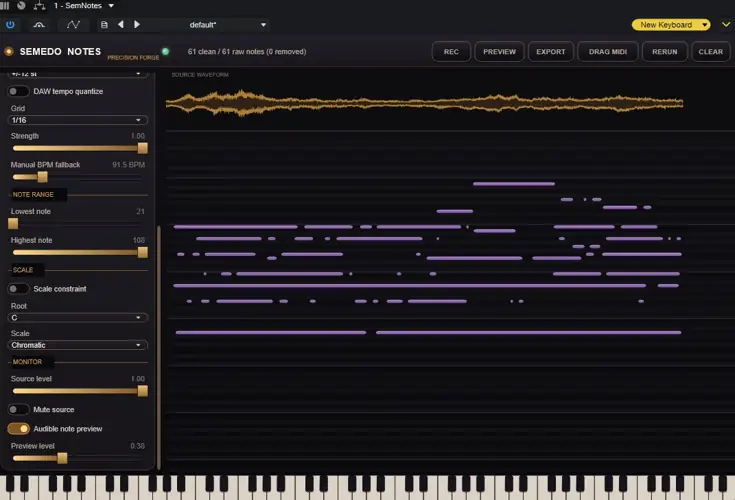
Align the transcribed notes to your project’s tempo grid automatically. Semedo Notes reads the BPM directly from your DAW — no manual entry needed while a project is open. Choose your grid (1/4, 1/8, 1/16, 1/32, triplets) and set how strongly the notes snap to it: 0 leaves timing completely raw, 1 locks everything to the grid. If no DAW tempo is available (standalone use or imported files), a manual BPM fallback is available.
SCALE FILTER
Constrain transcribed notes to a musical scale. Choose any root note and scale type: Major, Minor, Dorian, Mixolydian, Lydian, Phrygian, Locrian, Blues minor, Minor pentatonic, Major pentatonic, Melodic minor, Harmonic minor, Harmonic major — 14 scales in total. Notes that fall outside the chosen scale are removed, not moved. Semedo Notes never invents notes or shifts pitches to force a result.
NOTE RANGE FILTER
Set a minimum and maximum MIDI note to ignore anything outside the range you care about. Useful for filtering out low-frequency noise that gets transcribed as bass notes, or keeping only the range of a specific instrument.
MIDI DRAG AND DROP
When the transcription is ready, drag the MIDI clip directly from the plugin into a MIDI track in your DAW. No export dialog, no file browser — just grab and drop it where you need it.
MIDI EXPORT
Save the clean MIDI to a file at any point. The export button opens a standard save dialog. The exported file includes the correct tempo, note velocities, pitch bend data (if enabled), and RPN messages for MPE receivers.
MIDI OUTPUT
Semedo Notes sends its MIDI output to your DAW in real time. Route the plugin’s MIDI to any instrument track and preview the transcription through any sound you like.
BUILT-IN PREVIEW INSTRUMENT
A lightweight built-in synthesiser lets you hear the transcription inside the plugin without any additional routing. 32 voices, clean sine wave with smooth attack and release, soft limiter to prevent clipping. When MPE is active, pitch bends are played back correctly per voice in the preview too.
WAVEFORM DISPLAY
The original audio waveform is displayed above the piano roll so you can see exactly which notes correspond to which part of the recording. The waveform stays aligned with the notes and the playback head as you zoom and scroll.
PIANO ROLL
A full piano roll shows all transcribed notes with velocity shading — louder notes appear brighter. Zoom in and out with the mouse wheel. The playhead moves in real time during preview playback.
RE-ANALYSE FROM ORIGINAL
The original audio is kept in memory after transcription. If you change the Detection Confidence or other model parameters, Semedo Notes can re-run the full analysis from the original recording without you having to drop the file again or re-record.
LOW CPU USAGE
All heavy processing — audio loading, resampling, AI inference — runs on a background thread. The audio thread does no analysis work, no memory allocation, and holds no locks. Your DAW stays responsive and dropout-free while Semedo Notes works.
SAFE DURING PLAYBACK
Semedo Notes never interrupts your DAW’s audio output. Analysis runs in the background. Results appear in the piano roll when ready. You can keep playing and recording in your project the whole time.


SemNotes.1.0.17 ( 14 MB )