AutoADM
92 MB
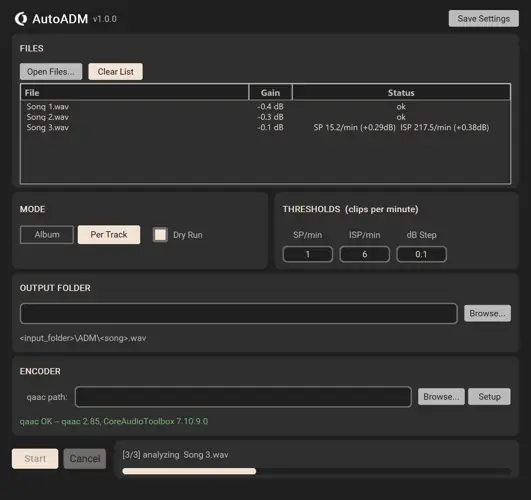
Automated peak-safe Apple Digital Masters from your WAV files. AutoADM prepares your WAV masters for Apple Music’s AAC encoder. It iteratively attenuates each file until the resulting AAC encode contains no sample-peak (SP) or inter-sample-peak (ISP) clips — the same process Apple recommends for the Apple Digital Masters program, fully automated.
Features
Album / Per-Track Modes
Album mode finds the single worst-case gain across all files and applies it uniformly (preserving inter-track loudness relationships). Per-Track mode attenuates each file independently.
Dry Run
Compute the exact gain needed without writing any files — useful for previewing how much headroom your master actually needs before committing.
Clips-per-Minute Thresholds
Set how many sample peaks (SP/min) or inter-sample peaks (ISP/min) you’re willing to tolerate — more intuitive than abstract max-peak-dB numbers.
BS.1770-4 ISP Detection
4× polyphase oversampling on the decoded AAC matches the ITU-R recommendation, the same method Apple uses to flag inter-sample clips.
Apple’s Own Encoder
Uses Apple’s afconvert directly — the exact AAC encoder Apple Music runs against your masters server-side. No third-party AAC libraries in the production path.
Preserves WAV Format
Output WAVs keep the original bit depth and sample rate of the input — no forced 16-bit or downsampling unless your master needs it.
Usage
1. Extract the archive and launch OD AutoADM.app — no installation needed.
2. Add WAV masters via Open Files or drag & drop.
3. Pick a Mode — Album (uniform gain across the record) or Per Track.
4. Set your thresholds (SP/min, ISP/min) — defaults are sensible.
5. Click Start. Output WAVs land in /ADM/ with the original bit depth and sample rate preserved.


OD.AutoADM.1.0.2 ( 92 MB )