Tumult
230 MB
Noisemaker, texturizer, vintag maker audio effekt plugin
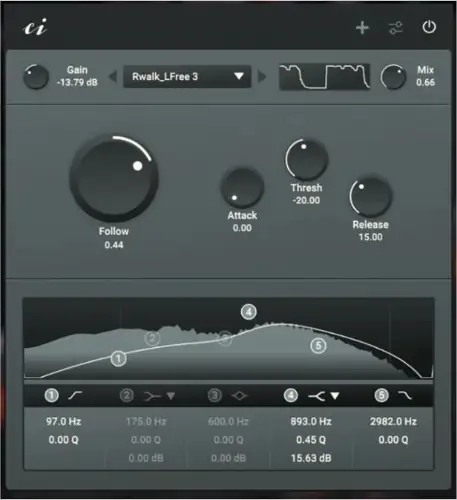
Tumult makes noise. Tumult texturizes, accentuates and adds warmth and age. Tumult comes with 50 hand-picked noises. You can play them raw, let them follow your sounds, or duck them away. Tumult comes with an 5-band EQ that lets you shape the noises to your liking. Tumult is a free and open source 64bit VST3 effect plugin for Linux and Windows.
How it works
The effect plugin plays one of 50 noises that can be added to the actual audio signal using the ‘Mix’ knob. The ‘Gain’ knob controls the volume, and the equaliser controls the frequency response of the noise – the actual audio signal is not affected.
In ‘Raw’ mode, the noise is played back without any influence. In ‘Duck’ mode, the noise is ducked away by the actual audio signal. In ‘Folllow’ mode, the noise only plays when the actual audio signal is playing (depending on the threshold).
How to install
Unzip the downloaded file.
Copy the entire ‘Tumult.vst3’ folder into the vst folder of your operating system. For Linux, this is the .vst3 folder in the home directory. For Windows, this is in ‘C:\Program Files\Common Files\VST3’.
Copy the ‘TumultSamples’ folder wherever you want, for example to a location where you also save other samples.
In order for Tumult to find the samples, the path to the sample folder must be specified in the plugin. To do this, open the plugin in a host of your choice, open the settings, select ‘Change Sample Folder Location’ and select the ‘TumultSamples’ folder. For the changes to take effect, you must remove the plugin from the host and reload it.


Tumult_1_1_0_Win_vst3 ( 228 MB )